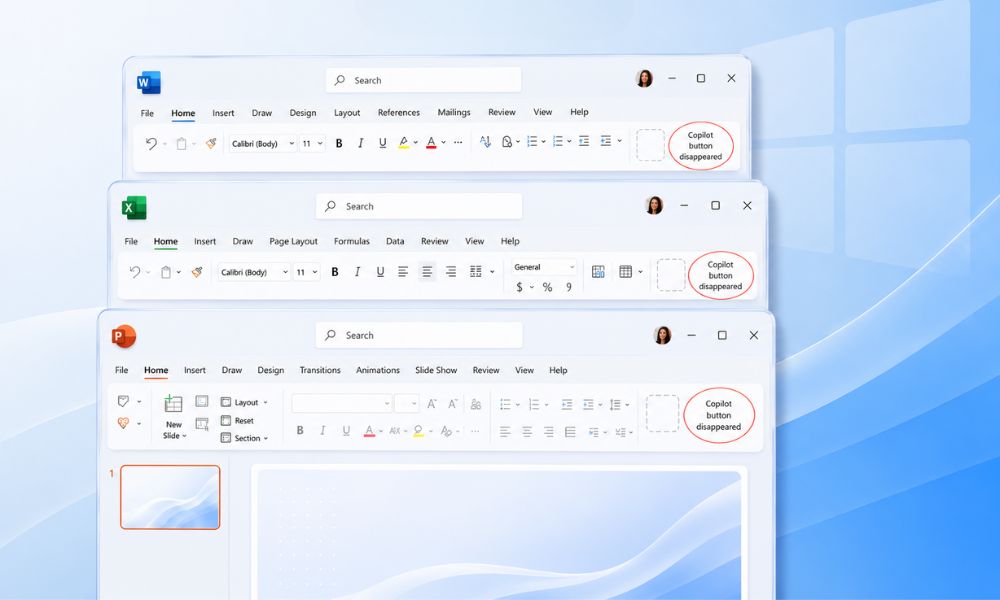
Microsoft is going ahead with its aggressive push towards premium adoption of Microsoft 365 Copilot, bringing significant changes in how users access AI features across Office apps. The tech giant is moving the in-app Copilot experience closely to paid license, company size, and admin settings.
As of April 15, 2026, many Microsoft 365 users on basic 365 plans or without premium Copilot license have reported that the familiar Copilot button has disappeared from Word, PowerPoint, Excel, and other Office apps. Basic 365 users can continue to use Copilot Chat through the Microsoft 365 Copilot app, the web browser, SharePoint, Edge, and Outlook, but no longer within Word, Excel, PowerPoint, or OneNote directly.
The change reflects Microsoft's efforts to distinguish between licensing tiers. Copilot pane in Office applications is reserved for Premium Copilot subscribers. Organizations with more than 2,000 users are also affected, as they now require an advanced license to retain Copilot integration within Office apps.
How Users Can Restore Missing Copilot Features?
Users who suddenly have lost access to the Copilot AI button are advised to verify their subscription status through Microsoft account. If you find that your subscription tier is not the reason for the missing button, there are other ways through which you can troubleshoot the missing Copilot AI chat button:
- Make sure you are signed in with the right account.
- You can update your license to a Premium tier and get the Copilot button back.
- Fix if there are any changes in your Account Privacy settings. Ensure Turn on optional connected experiences and Experiences that analyze your content both are checked in, as these are required for Copilot functionality.
These troubleshooting steps can help restore access to users whose subscription remains eligible. However, for many customers the missing Copilot button is the result of Microsoft's changes to its licensing structure.
Auto-Installation of Microsoft 365 Copilot Coming
Another update is, the Microsoft 365 Copilot app will install Microsoft 365 Copilot app automatically on eligible Windows PCs with Microsoft 365 desktop apps. As mentioned in Microsoft's latest document, "Starting June 2026, we will resume the automatic installation of the Microsoft 365 Copilot app to eligible devices with the Microsoft 365 desktop apps." The roll out is expected to continue through mid-July 2026.
With this, users can discover and engage with the AI productivity feature easily. The Microsoft 365 Copilot app will be seen automatically, with installation or activation enabled by default. However, organizations in the European Economic Area are exempt from automatic installation.
Following recent updates, the Copilot button has reappeared across Office experiences including sidebars, ribbons, and cloud-based features for premium subscriptions or enterprise licensed users, and not for basic users who lost it. This roll out is for the Microsoft 365 Copilot app; however, the company is also expecting its entry across Excel, Outlook, Word, Teams, PowerPoint, and Microsoft 365 on the web.
Users Can Still Disable Copilot
For users who do not prefer using Copilot, Microsoft has several options to disable or hide the feature. According to the company, admins will need to opt-out if they do not want the Copilot app to appear on the devices automatically.
- Remove the Copilot app from the Office app.
- Changing your privacy settings to block Copilot in office apps.
- Removing Copilot from Office apps Ribbon.
- Administrative Group Policy Settings.
Considering the criticism and user pushback, Microsoft seems to be committed to making Copilot an important part of Microsoft 365 experience, while allowing users to upgrade to premium subscriptions.
Learn more about the latest happenings in the tech on our website. We publish news updates daily, so you don't miss important tech developments, partnerships, upgrades, and more. Visit now and stay informed.
Recommended For You:
Everything You Need to Know About GitHub Copilot: A New AI System